Prime Care Tech Marketing

Prime Care Tech Marketing


Recent posts by Prime Care Tech Marketing

2 min read

Getting Paid for Part A Therapy Services

By Prime Care Tech Marketing on Tue, Nov 15, 2011 @ 06:19 PM

Billing Medicare Part A for Ancillary Therapy Services - a change in what units represent

Focusing on Medicare’s coverage and payment for ancillary therapy services,Proper Therapy Unit Codes Transmittal 2239 (CMS Manual, Pub 100-04 Medicare Claims Processing, issued June 14, 2011, Billing SNF PPS Services, 30.4 - Coding PPS Bills for Ancillary Services) states, effective August 1, 2011, “For therapy services, that is revenue codes 042x, 043x, and 044x, units represent the number of calendar days of therapy provided.  For example, if the beneficiary received physical therapy, occupational therapy and speech-language pathology on May 1, that would be considered one calendar day and would be billed as one unit.” (Italics added.)

In other words, for each day a Medicare patient receives a therapy service, providers must record that as one unit. In the past, the number of units reported on a claim reflected the number of treatments provided. That is no longer the case. The new policy stipulates that units of therapy should tie to the number of days the patient received therapy services, NOT the number of treatments. For codes 042x, 043x, and 044x, providers are to record the total number of days a resident received therapy treatments as one unit for each day. Providers can look at this as an “on/off switch,” “yes or no” answer. Did the resident receive PT today? If, “yes,” then record 1 unit. If a resident had 16 days of physical therapy treatments, for example, the 042x revenue code should indicate 16 units. The aggregate of the total units/days of therapy services received would be recorded on the claim. 

The transmittal further stipulates that “SNFs are required to report the actual charge for each line item, in Total Charges.” The total should reflect the charges for actual treatments received as determined by your facility’s/company’s charge master and recorded in the Total Charges field.

Questions

If you are using a clinical software application for documenting therapy services, does it automatically convert days of service to units to be recorded in aggregate on the claim while recording the charges based on the quantity of treatments?

What changes were necessary for you to comply with this regulatory change?

With the hiring of Ms. Becky Bos and Ms. Kimberly Kelly, PCT offers enhanced Revenue Management Consulting Services to long term care providers. Cuts in Medicare and Medicaid services have forced providers to effectively maximize and capture the revenue they are able generate. Becky and Kimberly have extensive experience and expertise in working with large multi-facility corporations and small regional providers to identify and collect the cash owed. This is the first in a series of articles in which Becky and Kimberly share their collective wisdom regarding sound billing and collection practices providers can employ.

Topics: Part A Therapy Services therapy units transmittal 2239 042x 043x 044x therapy codes Medicare Part A revenue cycle management
3 min read

It’s time for IT to step up and save the game!

By Prime Care Tech Marketing on Mon, Aug 29, 2011 @ 11:19 AM

IT must demonstrate its ROI in LTC nowIn the Spring of this year, I used baseball as a metaphor for the “game of Long Term Care.” At that time I said that providers were “going to have to step up to the plate and respond swiftly and powerfully to the curve balls of regulatory changes, the sliders of reimbursement, the change-ups of market pressures, and the fast balls of competition.” Little did I know at the time that the term, “sliders of reimbursement,” was going to be uncomfortably prophetic. Because of the drastic “adjustments” to Medicare reimbursement and declining Medicaid rates, the slider is real – a potential slide downhill, that is; they’re game changers. I would like to take the baseball metaphor one swing further.

A successful swing at the plate requires not only skills, talent, great vision, quick reflexes, good upper body strength, and sound judgment, but a solid bat as well, one that each batter can handle comfortably and confidently. It’s the tool that hitters rely on. In the case of LTC, the “bat” I am referring to is IT (information technology). And it’s time for IT to prove its worth as a tool to identify savings without cutting quality and to prevent unnecessary revenue leakage through automated tools and processes.

Savings – the IT Infrastructure

Let’s start with IT itself. Article upon article and one study after another have clearly identified that the “cloud” offers the scalability, flexibility, reliability, and savings that other methods of IT deployment may not offer. Cloud-based computing means lower initial costs and TCO, because all IT-related procurement, maintenance, management, and upgrades are handled remotely. Further, the cloud’s monthly subscription-based model enables providers to use their capital for other critical areas of their business. Earlier this year, the CIO Consortium identified that, “Reasonable, five-year costs to deploy currently available EMR technology and eliminate paper records range from $254,000 per facility for third party hosted solution (italics and color added for emphasis), $259,000 for vendor hosted Software as a Service (SaaS), and $356,000 for an in-house hosted solution.” Clearly, now is the time to carefully consider the cloud as a solid source for immediate and long-term savings.

Real Savings through IT Tools

What specifically does IT offer that will help providers identify savings, stop revenue leakage, and ensure that they are in compliance with regulations? The answer is automation - automated claims management to stop revenue leakage; automated MDS and RUGs reporting; automated procurement to make sure that purchases are per contract pricing, timing, and quality; automated labor management; and automated real-time Key Performance Indicator (KPI) reporting.

Automated claims management helps providers not only to generate, review, edit, and transmit claims, but to identify and act immediately on issues when and where they occur. This includes incorrect claims codes, codes changes and regulations, missing codes, poor communication between clinical and billing staff, poor pricing practices, and inefficient and ineffectual internal review processes.

Automated MDS and RUGs reporting lets providers identify facilities most "at risk" with poor survey performance; discover how each of their facilities ranks among its peers; pinpoint facilities which are operating below or above critical primary care staffing levels; detect residents/patients who are clinically at risk; observe the financial impact of MDS submissions by facility, region, and corporation; scrutinize QM/QI’s at a facility, region, or corporate level, and analyze reimbursement rates (RUGs).

Automated procurement involves complete commerce automation (purchase orders, invoices, and product and contract maintenance) and reporting with intelligent direction and feedback for procurement decisions.  It connects multiple facilities, satellite locations, and branch offices to the vendors, products, pricing, delivery terms, and service providers carefully negotiated and selected by their parent company. Automation allows flexibility and customization for each corporate entity to support their partner selection, the business rules negotiated with each partner, their internal G/L structure, and their purchasing chain of command.

Automated labor management gives providers the tools necessary to manage and control that which amounts to almost 60-70% of a provider’s spend – labor. Automation offers applicant tracking, time and attendance, payroll, and human resources management. Not only can providers reduce costs wisely, but also increase productivity.

Automated real-time Key Performance Indicator (KPI) reporting, or a digital dashboard, translates into business intelligence, which to LTC providers means they can quickly analyze and act on census levels, admissions, and discharges; labor hours and costs; and receivables and collections. Armed with this incredibly valuable information, providers are able to monitor how well they are saving money and increasing revenue in real time and take action, when necessary, with surgical precision.

Summary

IT through the cloud will not only help providers survive, but ultimately win, by confidently hitting whatever is thrown at them out of the park.

Topics: long term care business intelligence dashboard cloud computing IT infrastructure Key Performance Indicators Data Mining human resources automated claims management automated procurement labor management MDS RUGs revenue leakage cloud-based computing
3 min read

ITAM - What it is and why should providers care

By Prime Care Tech Marketing on Tue, Jul 19, 2011 @ 02:59 PM

ITAM covers all IT assetsPersonal productivity devices, such as desktops, laptops, smartphones, and tablet PCs, and the data they generate and retrieve have contributed to a wealth of information and…risks for Long Term Care. If Information Technology (IT) managers are unable to monitor, manage, and protect productivity devices, software distribution, and how information is exchanged and filed, providers run a considerable risk of data loss, non-compliance, and potentially fatally damaging their operations. Implementing sound hardware and data management practices is the responsibility of all providers. IT Asset Management (ITAM) embraces the technology and best practices that can help IT Managers with this critical task.

What is asset management?

ITAM encompasses mostly the hardware components of the IT infrastructure and its interconnected computers - in other words, everything that supports the flow and processing of information. Consider, for example, data and computers. What IT assets do you have? Where are they? Who has access to them and who is using them? What is the lifecycle of each? What are the procedures for safeguarding each? What is the most cost-efficient method for tracking and maintaining them? One way to look at this challenge is to consider that IT is a business within a business. ITAM is the specific method and tools you employ to manage that business. It is 80% systems and 20% tools.

Why ITAM?

A few years ago, Patricia Adams, Research Director, Gartner Research, identified five drivers toward IT asset management:

  • Software license compliance. Most vendor contracts authorize compliance audits. The Business Software Alliance (BSA) is now offering rewards of up to $200,000 for qualified piracy leads.
  • ITIL (IT Infrastructure Libraries). ITIL outlines an extensive set of management procedures that are intended to support businesses in achieving both quality and value, in a financial sense, in IT operations.
  • Cost control. This includes the cost of IT labor, purchasing, and managing device complexity.
  • Asset security. This involves monitoring and managing asset displacement and network assets.
  • Operational efficiency. With ITAM, most facets of your business run more smoothly.
    Neglecting ITAM can be risky?

In the absence of ITAM, LTC providers are at risk. They may suffer unauthorized access to or the loss or corruption of critical business information and EPHI (electronic protected health information). The impact of such could include liability risks, poor public relations, including diminished shareholder value and goodwill, exposure to and during law suits, and a significant disruption in the conduct of business.

A disruption in business, for instance, will likely involve non-productive time, even downtime resulting from non- or mal-functioning equipment, critical documentation missed or erroneously recorded, missing files, emails not received, and an inability to send MDS or other claims. Providers may also experience loss of continuity in the form of missed deadlines or poor communications. By not managing computing devices, users may download unauthorized applications or updates which can introduce software incompatibilities, even viruses or other malware.

The risks can be costly

Providers also risk increased or unnecessary costs. Malfunctioning IT assets mean upset users; upset users mean increased support calls, which can be costly in terms of needed help desk resources to handle such calls. In the absence of ITAM, providers may have to unnecessarily search out and recover lost data/files. In recovering lost files, providers experience down time and fees associated with archived data retrieval, assuming the data/files can be found. Additionally, lost/misplaced inventory, unnecessary repairs, or necessary repairs not addressed, can also disrupt the day-to-day flow of business.
Other risks include exposure to software licensure and regulatory non-compliance which may result in significant fines/penalties.

Conclusion

An organized and well executed ITAM program is a sound business investment – a practice that should not be ignored.

Question

  • In the absence of ITAM, what other risks do businesses/providers run?
  • What have you implemented to manage your IT assets?

Next Time

In future blogs we’ll discuss ITAM best practices and tools available today through the cloud. Until then, write, if you get a round to IT.

Topics: IT infrastructure computer protection IT asset management ITAM
2 min read

What ACOs mean to IT – interoperability and infrastructure

By Prime Care Tech Marketing on Mon, Jun 27, 2011 @ 06:44 PM

I argue that Accountable Care Organizations (ACOs) do not represent a health care delivery revolution, but an evolution. Based on my experience in LTC and what I’ve been reading on the Internet, ACOs appear to be an evolutionary variant of the species known as HMOs. Regardless, ACOs represent a significant change to health care delivery. The ACO model will have a sweeping impact on how health care is planned for, delivered, documented, reported, and paid for. It follows that for an ACO to work, information technology serves as the glue that holds it together; those providers who have successfully worked with HMOs can attest to the critical role IT plays. Participation as ACO members will require providers to carefully evaluate what such participation will have on their respective IT systems.

Let’s explore this in more detail.

An ACO is a group of providers and suppliers of services that cooperatively deliver seamless, high-quality care to Medicare beneficiaries while reducing costs. Therefore, ACO providers must coordinate, deliver, document, monitor, and report patient care not only in terms of the quality of the care delivered, but the costs related to that care. The key word here is “interoperability.” This means the ability of health information systems to work together within and across organizational boundaries in order to advance the cost-effective delivery of healthcare. Interoperability involves seamlessly integrating data and information within each organization and among all providers who participate in an ACO.

More expansively, “interoperability” includes:
• Moving data among all providers
• A consistent data presentation
• A uniform user interface or controls
• Data security and integrity
• Uniform protection of patient confidentiality
• Consistent system service quality

In other words, each provider must at least have a fully-integrated clinical and financial system in place. This system must reliably, securely, and with interoperability communicate with other ACO members’ systems.

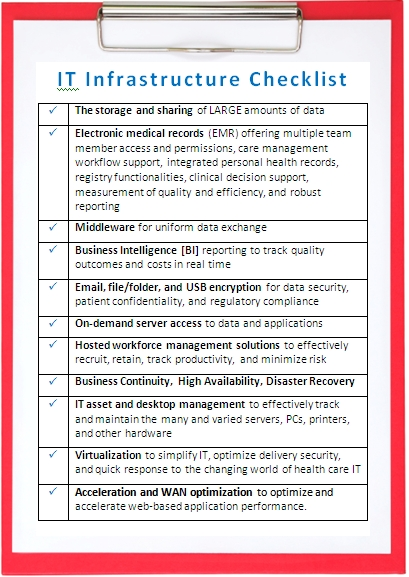
So, what’s the impact on a provider’s IT infrastructure? In general, the IT infrastructure will need to include:

IT Interoperability Infrastructure

So, if ACO’s are in your organization’s future, will you be ready?
• Do you know where IT is today and what you will need?
• How much will it cost to get IT up and running quickly, securely, and affordably? With outsourcing* - sooner than you think and with little to no capital.
• How much will it cost to maintain it? It’s less expensive than you may think.

If ACOs are not in your future, is the IT infrastructure checklist relevant? We’ve found that if you think it is, you’re ahead of the curve. However, if you think not; we urge you to think again.

*Cloud-based managed hosting infrastructure, services, and solutions have helped LTC providers leverage any and all such opportunities, such as ACOs offer, quickly and affordably.

Questions:
Are ACO’s in your future?
What impact do you think ACOs will have on IT?

Topics: ACOs Accountable Care Organizations cloud computing interoperability IT infrastructure
3 min read

Systems and Data Disaster Preparedness

By Prime Care Tech Marketing on Mon, Jun 20, 2011 @ 01:04 PM

Disaster recovery must include IT systems and data.It’s that time of year again.
In 2011, the desolation and loss of life in the wake of the massive tornados in Joplin, MO, in Tuscaloosa, AL, and other states have captured the attention of LTC providers across the country with the realization that disasters can strike anywhere, at anytime. They recognize the need for a real-world, workable, and well-rehearsed disaster preparedness and recovery plan that at least minimizes, if not prevents, injury and loss of life during and after a disaster.

Post-disaster recovery, however, must also encompass access to resident information, because in the world of EMR, electronic data can be lost if the servers or other storage devices are damaged by fire, flooding, or building collapse. Fortunately, there are steps which you can implement now to protect that vital information before a disaster strikes.

Backup procedures (a good start) - A basic IT disaster preparedness plan must include a regularly-scheduled daily back-up of data with off-site storage and I don’t mean in an employee's home. Tip: One important thing to remember about backups: they should be regularly tested. Nothing is more frustrating than to need a backup and find that the data is corrupt or non-existent.

Fault tolerance - The next step up in disaster recovery is to build fault tolerance into all of your critical systems. This means installing Redundant Array of Independent (or Inexpensive) Disks (RAID) drives (disk drives which are redundant copies of each other), clustered systems, and other types of local recovery procedures.

What happens if - Once you have a good backup and archiving procedure with critical fault-tolerant systems in place, the next step is to put together procedures for remote disaster recovery.

Option: Co-location

You might, for example, make arrangements with another company to share equipment and space if either is struck by disaster. Such an arrangement also requires agreements with critical computer vendors to quickly ship new systems in the event of an emergency. Although recovery would be slow, this kind of planning is a good first step.

Option: A Split Site

Some companies are large enough that the IT department could be staffed at more than one location. In the event of a disaster to one site, operations would simply shift to the other.

Option: A Cold Site

This is a site (often managed by a third party and shared among multiple clients) which is stocked with equipment and ready to go. The remote servers are generally not “live,” and time is required to activate the off-site system should the need arise. This is a popular disaster recovery method, because it tends to be less expensive than other options and gives a company the ability to be up and running with a brief delay.

Option: A Warm Site

If a company has the resources, then a warm site is a viable alternative. This is a site which is pre-positioned with equipment, software, and other necessities ready to go in the event of an emergency. The equipment is idle, often turned off, but can be quickly restored and brought online. Data is available quickly and can be restored without much difficulty. However, a high level of competence and forward thinking is required to plan, build, and maintain it.

Option: A Hot Site

In this scenario, a duplicate computer center is available in a remote location from as little as a few miles to hundreds of miles away from the primary computer facility with communications lines set up and actively copying data at all times. At a minimum, the site has a duplicate of every critical server up and running with data that is up-to-date.

Option: The Cloud

By its very nature, the cloud is designed to handle business continuity; high availability; and disaster recovery. So that in the event of a disaster, management and staff can access business-critical applications and data anytime from anywhere. Cloud Services Providers (CSPs), like PCT, provide pooled resources, flexibility, scalability, security, and reliability to businesses of all sizes so that businesses can store their data, applications, systems, and services.

Don’t wait! Act!

Regardless of the option you choose, having a viable systems and data disaster recovery system is critical.

Topics: cloud computing disaster recovery disaster preparedness

Featured

Posts by Tag

See all